
How to add a custom animation in interaction
Step 1: Add a new option via bricks/setup/control_options hook
Section titled “Step 1: Add a new option via bricks/setup/control_options hook”Hook documentation: /developer/hooks/filters/filter-bricks-setup-control_options/
add_filter( 'bricks/setup/control_options', function( $options ) {  // Add custom animation into animationTypes  // Note that the key is very important, must be unique  $options['animationTypes']['myAnim1'] = esc_html__( 'My animation 1', 'bricks' );
  return $options;}, 10 );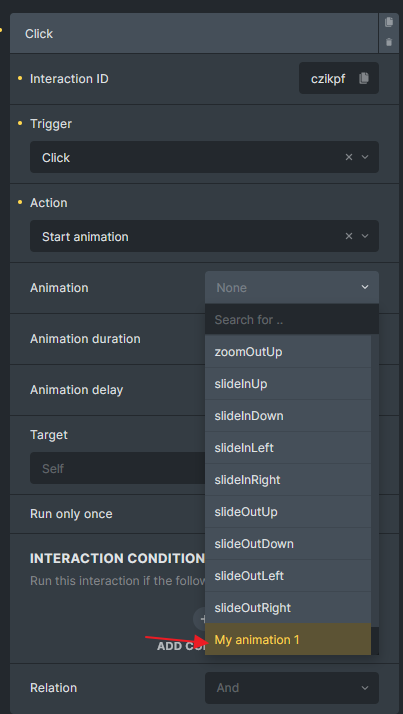
Custom animation added to the interaction “Animation” dropdown
Step 2: Add animation CSS
Section titled “Step 2: Add animation CSS”When the interaction is set, Bricks will assign a class to the element using your animation key (myAnim1 in our example), and it will be prefixed with brx-animate-.
All you have to do is create a CSS class that sets the animation name for your element, along with the corresponding keyframes for your animation. You can place these CSS inside Bricks > Settings > Custom Code > Custom CSS.
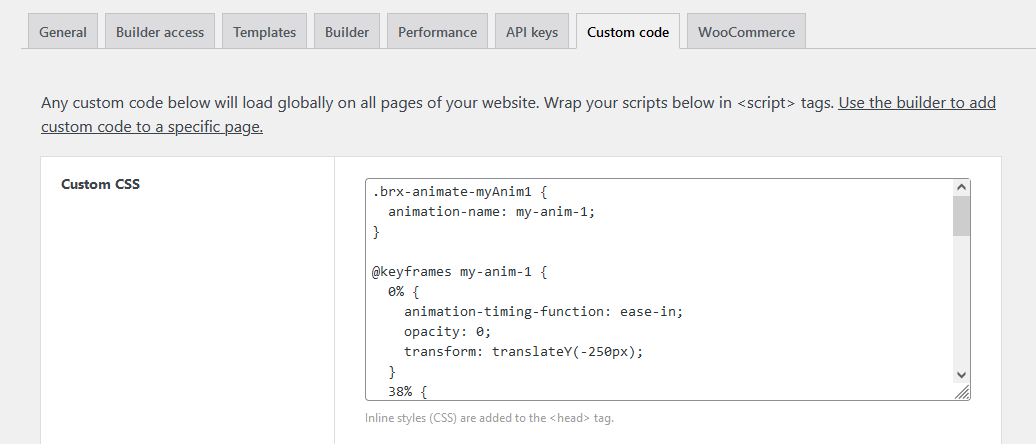
.brx-animate-myAnim1 {  animation-name: my-anim-1;}
@keyframes my-anim-1 {  0% {    animation-timing-function: ease-in;    opacity: 0;    transform: translateY(-250px);  }  38% {    animation-timing-function: ease-out;    opacity: 1;    transform: translateY(0);  }  55% {    animation-timing-function: ease-in;    transform: translateY(-65px);  }  72% {    animation-timing-function: ease-out;    transform: translateY(0);  }  81% {    animation-timing-function: ease-in;    transform: translateY(-28px);  }  90% {    animation-timing-function: ease-out;    transform: translateY(0);  }  95% {    animation-timing-function: ease-in;    transform: translateY(-8px);  }  100% {    animation-timing-function: ease-out;    transform: translateY(0);  }}
Now, you can use this new animation on any element from the “Interactions” panel.
Was this helpful?
A quick vote and short notes help us improve these docs faster.
Leave a note for us
Please do not include passwords, license keys, or personal data. We store submitted notes to improve the docs.
Thanks for sharing feedback. We're using it to improve these docs.