
Checkout v2
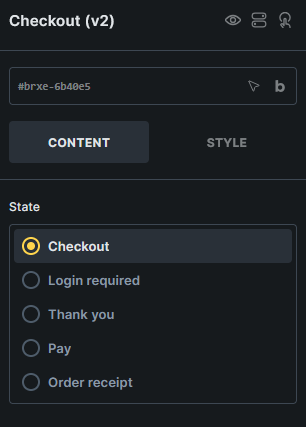
Displays the WooCommerce checkout page as editable Checkout, Login required, Pay, Thank you, and Order receipt states.
Where this element works
Section titled “Where this element works”Checkout page.
Key settings
Section titled “Key settings”- State (radio) - Switches the builder preview between checkout states.
States
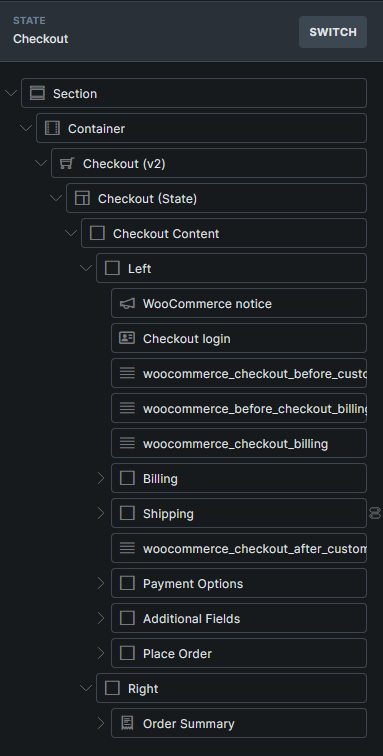
Section titled “States”- Checkout - Customer details, order summary, payment options, and place order layout.
- Login required - Login screen shown when WooCommerce requires login before an order-related checkout screen.
- Pay - Payment screen for unpaid orders.
- Thank you - Order confirmation screen after checkout.
- Order receipt - Receipt screen for unpaid order links that no longer need payment.
Generated structures
Section titled “Generated structures”The Checkout state can generate these structures:
- Complete checkout
- Billing fields
- Shipping fields
- Payment options
- Additional fields
- Order summary
- Place order
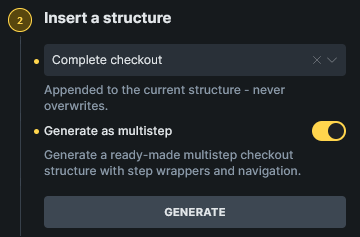
When Complete checkout is selected, Generate as multistep creates a ready-made multistep checkout layout.
The Billing fields and Complete checkout structures also generate the account credential fields currently required by WooCommerce. Bricks places these fields inside a Checkout account fields wrapper so WooCommerce’s account-creation settings control their frontend visibility.
The Login required, Pay, Thank you, and Order receipt states each provide a complete block for that state.
Payment section for free orders
Section titled “Payment section for free orders”In the Checkout state, payment methods are hidden when the cart does not require payment, such as after a coupon reduces the total to zero. They reappear when a shipping or coupon change makes payment necessary again.
The brx-woo-payment-section class lets the surrounding payment section, including its heading, hide and reappear with the payment methods. Newly generated Payment options and Complete checkout structures include this class on the Payment Options wrapper, including the multistep layout.
Existing checkout layouts are not updated automatically. If the class is missing, add it manually:
- Edit the assigned Checkout page with Bricks and select the Checkout state.
- In the Structure panel, select the wrapper containing the payment heading and Payment options element. In generated layouts, this is the Payment Options Block.
- Open Style > CSS > CSS classes and add
brx-woo-payment-sectionwithout a leading dot. Keep any existing classes, separated by spaces. - Keep the terms checkbox and Place order controls outside this wrapper so customers can still submit free orders. In a multistep layout, add the class to the payment section wrapper inside the step, rather than the entire Checkout step.
- Save and test the checkout on the frontend with both a zero total and a total that requires payment.
Without this wrapper class, the payment methods still hide for free orders, but the surrounding heading and section can remain visible.
Account creation during checkout
Section titled “Account creation during checkout”Checkout v2 follows the guest checkout and account creation settings under WooCommerce > Settings > Accounts & Privacy.
| Guest checkout | Account creation during checkout | Checkout behavior |
|---|---|---|
| Enabled | Disabled | Guests can check out without account fields. |
| Enabled | Enabled | Guests can select Create an account? to reveal the required account fields. |
| Disabled | Enabled | Account creation is required. The account fields remain visible without the optional Create an account? checkbox. |
| Disabled | Disabled | Logged-out customers see the Checkout v2 Login required state. |
WooCommerce decides which credential fields are required:
| Generate account login | Send password setup link | Credential fields |
|---|---|---|
| Enabled | Enabled | None |
| Disabled | Enabled | Username |
| Enabled | Disabled | Password |
| Disabled | Disabled | Username and password |
Generated username and password fields are required. Bricks reads these fields from WooCommerce’s current checkout field registry, including fields added by third-party plugins, instead of assuming a fixed set.
The Allow customers to create an account on the My Account page setting applies to Account Page v2 registration and does not change account creation during Checkout v2.
Multistep checkout
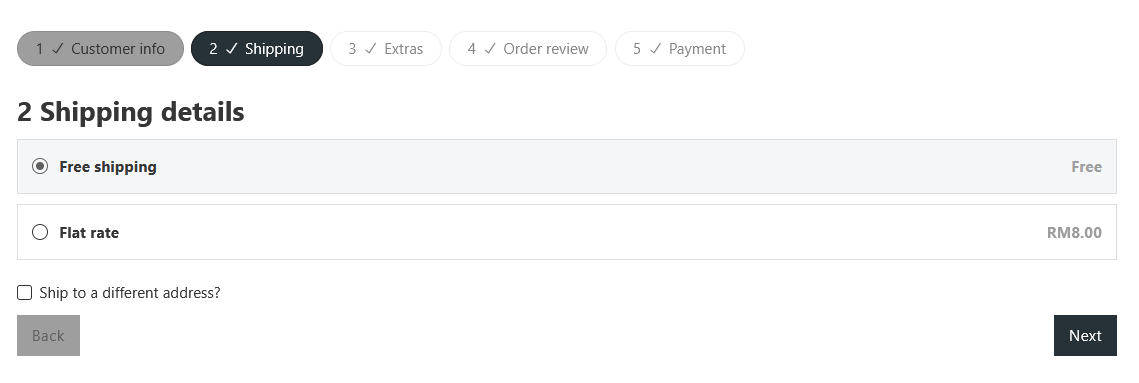
Section titled “Multistep checkout”Use Checkout v2 multistep checkout when you want the Checkout state split into multiple steps.
You can create the multistep layout with the Woo Setup Wizard by choosing Advanced multistep (v2), or generate it from the Checkout state by selecting Complete checkout and enabling Generate as multistep.
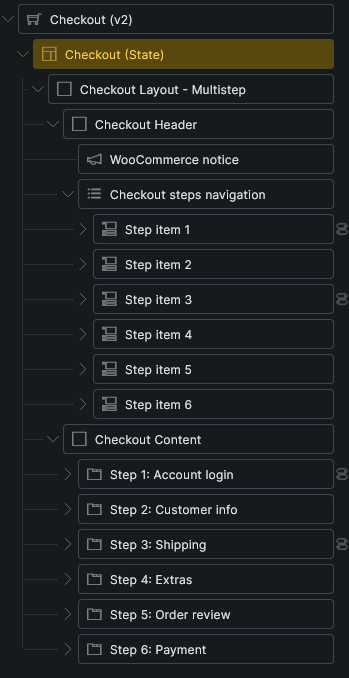
The generated layout includes Checkout steps navigation, checkout step nav items, checkout step wrappers, and next/back interactions.
Field maintenance
Section titled “Field maintenance”When order notes are disabled in WooCommerce, a saved Order notes field can remain visible in the builder while being hidden on the frontend. Remove unused notes elements or empty headings from Additional fields, keeping any fields used by checkout extensions.
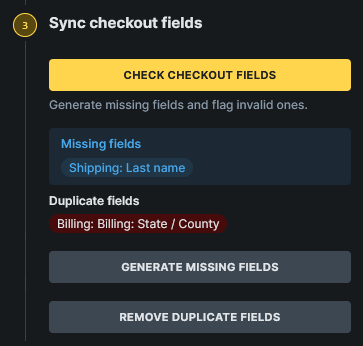
Checkout v2 includes a Sync checkout fields control group with actions to compare generated fields with the site’s current WooCommerce checkout fields:
- Check checkout fields
- Generate missing fields
- Remove invalid fields
- Remove duplicate fields
Use these after changing WooCommerce checkout fields or installing plugins that add checkout fields.
Field sync can report valid, missing, invalid, and duplicate generated fields. It can generate missing fields, remove generated fields that no longer exist in WooCommerce, remove duplicate generated fields, and update generated field labels and placeholders from the current WooCommerce field data.
The audit includes WooCommerce’s account field section. Missing account fields are inserted into the Checkout account fields wrapper, while billing, shipping, and additional fields remain in their corresponding checkout sections.
Enabling Generate account login or Send password setup link does not remove the corresponding saved username or password element from an existing Checkout v2 structure. Until you run field sync, an element that WooCommerce no longer registers can still render as an optional field, but WooCommerce does not process its value because it generates that credential. Run Check checkout fields, then Remove invalid fields.
Checkout structures created with a Bricks 2.4 beta may contain a standalone Create account checkbox or may not contain the account wrapper. Regenerate the checkout structure or use the field sync actions after updating. Bricks creates the wrapper when missing account fields are generated and removes an obsolete standalone checkbox after the replacement wrapper and checkbox exist.
Query loops, dynamic tags, and interactions
Section titled “Query loops, dynamic tags, and interactions”For saved Thank you layouts, see Failed-order messages to replace a typed payment failure message with {woo_order_failed_text}.
Checkout v2 supports WooCommerce v2 query loops for applied coupons, fees, taxes, order items, order totals, order downloads, and customer notes.
It also adds checkout/order tags such as {woo_checkout_current_step_number}, {woo_order_number}, {woo_order_total}, {woo_order_item_count}, and {woo_order_total_with_item_count}.
For multistep checkout layouts, use the Checkout step interaction action to move to the next step, previous step, a specific step, or a specific checkout field.
See WooCommerce v2 query loops and dynamic tags for the complete reference.
Usage tips
Section titled “Usage tips”- Use WooCommerce advanced modular elements or the Woo Setup Wizard to create the recommended Checkout v2 structure.
- Design every checkout state that customers can reach, especially Pay, Thank you, Order receipt, and Login required.
- Use the classic Checkout template workflow if you prefer separate checkout templates.
Was this helpful?
A quick vote and short notes help us improve these docs faster.
Leave a note for us
Please do not include passwords, license keys, or personal data. We store submitted notes to improve the docs.
Thanks for sharing feedback. We're using it to improve these docs.