
Filter: bricks/element/settings
Bricks 1.5 adds the possibility to change the element settings before it is rendered.
This allows you to change a text element content programmatically, or add styles based on a custom conditional logic, like so:
add_filter( 'bricks/element/settings', function( $settings, $element ) {    // Add "[online]" text to all the headings elements if the visitor is logged in    if ( $element->name === 'heading' && is_user_logged_in() ) {        $settings['text'] .= ' [online]';    }
    return $settings;}, 10, 2 );
In case you need to programmatically add an element conditional display logic, check the filter [bricks/element/render](https://academy.bricksbuilder.io/article/filter-bricks-element-render/).
Example: Dynamically set WooCommerce Product Filter (Price) max price from all products
Section titled “Example: Dynamically set WooCommerce Product Filter (Price) max price from all products”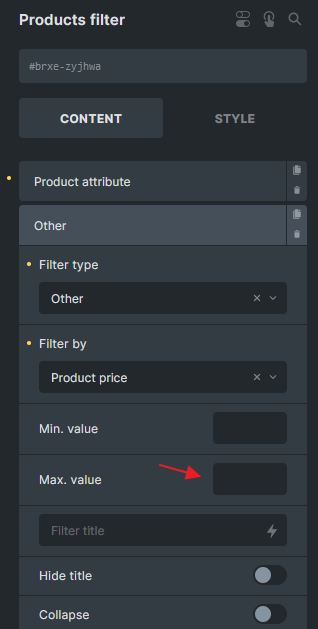
add_filter('bricks/element/settings', function( $settings, $element ) {  // Change the zyjhwa to your element ID  if( $element->id !== 'zyjhwa' || ! isset( $settings['filters'] ) ) {    return $settings;  }
  // Get all products  $products = wc_get_products(array(    'status' => 'publish',    'limit' => -1, // Retrieve all products  ));
  $highest_price = max(array_map(function ($product) {    return $product->get_price();  }, $products));
  foreach( $settings['filters'] as $key => $filter ) {    if( ! isset( $filter['otherFilter'] ) || $filter['otherFilter'] !== 'price' ) {      continue;    }
    $settings['filters'][$key]['sliderMax'] = $highest_price;  }
return $settings;}, 10, 2); Was this page helpful?