
Create Your Own Dynamic Data Tag
This article is intended for developers who wish to create a custom dynamic data tag within the builder.
The desired outcome should resemble the following example:
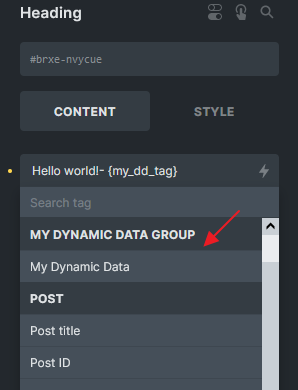
A custom dynamic tag labeled “My Dynamic Data”
Step 1: Register a tag through filter: bricks/dynamic_tags_list
Section titled “Step 1: Register a tag through filter: bricks/dynamic_tags_list”Use the bricks/dynamic_tags_list filter to render your custom dynamic data tag in the builder.
add_filter( 'bricks/dynamic_tags_list', 'add_my_tag_to_builder' );function add_my_tag_to_builder( $tags ) {  // Ensure your tag is unique (best to prefix it)  $tags[] = [    'name'  => '{my_dd_tag}',    'label' => 'My Dynamic Data',    'group' => 'My Dynamic Data Group',  ];
  return $tags;}
Step 2: Hook on several filters
Section titled “Step 2: Hook on several filters”1) bricks/dynamic_data/render_tag
Section titled “1) bricks/dynamic_data/render_tag”This will be used when \Bricks\Integrations\Dynamic_Data\Providers::render_tag() is called to parse a specific tag.
add_filter( 'bricks/dynamic_data/render_tag', 'get_my_tag_value', 20, 3 );function get_my_tag_value( $tag, $post, $context = 'text' ) {  if( ! is_string( $tag ) ) {    return $tag;  }  // $tag is the tag name with the curly braces after priority 10  // Replace all curly braces  $clean_tag = str_replace( [ '{', '}' ], '', $tag );
  // Only look for dynamic tag my_dd_tag  if ( $clean_tag !== 'my_dd_tag' ) {    return $tag;  }
  // Do your custom logic here, you should define run_my_dd_tag_logic() function  $value = run_my_dd_tag_logic();
  return $value;}
function run_my_dd_tag_logic() {  // Do your custom logic here  $my_value = 'My dynamic data value:';
  return $my_value;}
If you intend to accept an argument such as “my_dd_tag:arg1”, you may need to adjust the logic accordingly. Here is a basic example using PHP logic. For more complex scenarios, you can adapt the logic as needed:
add_filter( 'bricks/dynamic_data/render_tag', 'get_my_tag_value', 20, 3 );function get_my_tag_value( $tag, $post, $context = 'text' ) {  if( ! is_string( $tag ) ) {    return $tag;  }
  // $tag is the tag name with the curly braces after priority 10  // Replace all curly braces  $clean_tag = str_replace( [ '{', '}' ], '', $tag );
  // Only look for dynamic tag starts with my_dd_tag:  if ( strpos( $clean_tag, 'my_dd_tag:' ) === false ) {    return $tag;  }
  // Get argument  $argument = str_replace( 'my_dd_tag:', '', $clean_tag );
  // Do your custom logic here, you should define run_my_dd_tag_logic() function  $value = run_my_dd_tag_logic( $argument );
  return $value;}
function run_my_dd_tag_logic($argument) {  // Do your custom logic here  $my_value = 'My dynamic data value: ' . $argument ;
  return $my_value;}
2) bricks/dynamic_data/render_content and bricks/frontend/render_data
Section titled “2) bricks/dynamic_data/render_content and bricks/frontend/render_data”These will be used when \Bricks\Integrations\Dynamic_Data\Providers::render_content() is invoked to parse strings that may contain various dynamic tags within the content. One of the functions that perform this action is bricks_render_dynamic_data().
It is crucial to exercise extra caution while working on this aspect, as any mishandling may disrupt the dynamic tag functionality across the entire website.
add_filter( 'bricks/dynamic_data/render_content', 'render_my_tag', 20, 3 );add_filter( 'bricks/frontend/render_data', 'render_my_tag', 20, 2 );function render_my_tag( $content, $post, $context = 'text' ) {
  // $content might consists of HTML and other dynamic tags  // Only look for dynamic tag {my_dd_tag}  if ( strpos( $content, '{my_dd_tag}' ) === false ) {    return $content;  }
  // Do your custom logic here, you should define run_my_dd_tag_logic() function  $my_value = run_my_dd_tag_logic();
  // Replace the tag with the value you want to display  $content = str_replace( '{my_dd_tag}', $my_value, $content );
  return $content;}
If your dynamic tag accepts an argument, consider the following example:
add_filter( 'bricks/dynamic_data/render_content', 'render_my_tag', 20, 3 );add_filter( 'bricks/frontend/render_data', 'render_my_tag', 20, 2 );function render_my_tag( $content, $post, $context = 'text' ) {
  // $content is the content of the element, including other dynamic tags, HTML, etc.  // Only look for content starts with {my_dd_tag:  if ( strpos( $content, '{my_dd_tag:' ) === false ) {    return $content;  }
  // Regex to match my_dd_tag: tag  preg_match_all( '/{(my_dd_tag:[^}]+)}/', $content, $matches );
  // Nothing grouped in the regex, return the original content  if ( empty( $matches[0] ) ) {    return $content;  }
  foreach ( $matches[1] as $key => $match ) {    $tag = $matches[0][ $key ];
    // Get the dynamic data value, $match is the tag name without the curly brackets    // Can reuse the get_my_tag_value function created earlier    $value   = get_my_tag_value( $match, $post, $context );
    // Replace the tag with the transformed value    $content = str_replace( $tag, $value, $content );  }
  return $content;}
Note: Please ensure returning an array with image IDs if your dynamic tag is using on image element (image context). Please refer to the example in our forum threads: Dynamic data not rendered correctly on image element