
Global Queries & Query Manager
Starting with Bricks 2.1, you can create and manage reusable global queries. This lets you define query logic once and reuse it across your entire website. Any changes you make to a global query are automatically applied everywhere it’s used.
This feature improves efficiency, consistency, and maintainability for sites that rely on complex queries.
Creating a Global Query
Section titled “Creating a Global Query”-
Define a Local Query
- Insert a nestable element (e.g., Container, Block, Div).
- Enable the Query Loop.
- Configure query settings (e.g., post type, posts per page).
-
Save as Global Query
-
Click the new Save icon in the query control.
-
Provide:
-
Name (e.g., “Latest Three Properties”)
-
Description (optional, for team clarity)
-
Category (optional, useful for grouping queries)
-
-
-
Click Create.
The query now becomes global and can be reused site-wide.
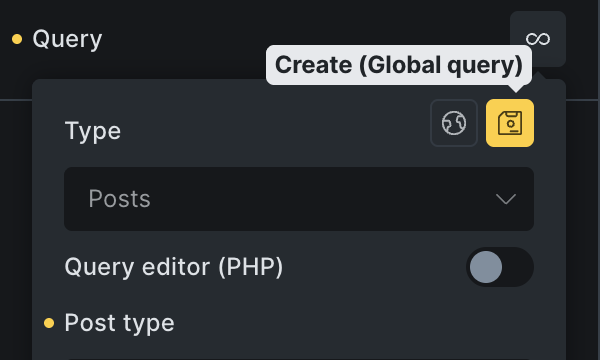
You can also create a global query inside the Query Manager.
Using a Global Query
Section titled “Using a Global Query”-
When adding a new Query Loop, click the globe icon.
-
Choose from your list of available global queries.
-
Bricks will apply the stored query logic automatically.
If no global queries exist, the globe icon will not be available.
Editing Global Queries
Section titled “Editing Global Queries”You can edit a global query in several ways:
-
Query Manager (recommended):
-
Toolbar: Manage → Query Manager, or
-
Use the Command Palette → Manage Queries.
-
-
Inline Editing:
-
Inside the Query Control, click the Edit (pencil) icon.
-
Bricks will indicate you are editing a global query (changes apply everywhere).
-
Edits update all instances that use the global query. For example, changing “Posts per page” from “3” to “5” updates every loop referencing that query.
Disconnecting a Global Query
Section titled “Disconnecting a Global Query”-
Use Disconnect to convert a global query into a local query.
-
The local query inherits the global settings as a starting point, but further edits won’t affect the original global query or other instances.
-
Useful when you want a slightly different query in a specific context.
Query Manager
Section titled “Query Manager”The new Query Manager lets you create, organise, edit, import & export all your global queries.

It can be accessed in those following ways:
-
Toolbar under Manage → Query Manager
-
From the Command Palette → Manage Queries
-
Query control Globe → Gear icon
Import & Export
Section titled “Import & Export”Global queries can be exported and imported as JSON files from the Query Manager.
-
Export: Creates a JSON file containing queries and categories.
-
Import: Upload the JSON file to another WordPress site to reuse queries.
This works the same way as exporting/importing classes and variables.
Summary
Section titled “Summary”The Global Queries & Query Manager feature in Bricks 2.1 allows you to:
-
Create reusable queries.
-
Apply them site-wide with a single click.
-
Edit once, update everywhere.
-
Disconnect for local variations.
-
Import/export for portability.
This makes query management more consistent, efficient, and scalable across projects.